
Having spent most of my career in the training field, I’ve always used Adobe products, which were provided by the companies I worked with.
Now that I’m on my own and shifting gears toward the next chapter in my life, I’ve replaced Adobe. Unless you own a company or are working for one, Adobe is just too damn expensive. I also hate subscriptions.
I remember when you could get software that was free and open source. You could even modify the code. It was great and it was free.
Then came the proprietary software. You bought it and you owned it. You could use it for years. If you wanted a newer version, you’d pay extra for it and it cost a small percentage of the original price.
Now in this age of ‘You will own nothing and be happy,’ you have to rent most software. That’s what a subscription is, and as Jimmy McMillan says: “The rent is too damn high.”
After my last job, I realized that I’d need to replace Photoshop, Premiere, Audition, and PDF Professional. Although I’m still trying to find the best PDF option, I’ve happy with replacing Photoshop with Affinity Photo 2 and Premiere with Wondershare Filmora.
Yes, neither of the replacements offer all the features of their Adobe counterparts, but I suggest trying the trial versions of Affinity Photo 2 and Filmora and see if those missing features were ones that you actually used when you had Adobe.
Affinity Photo 2
Affinity Photo 2 has many of the features that you would come to expect. The toolbar on the left is similar to Photoshop. There are some UI differences. In these three screenshots, you’ll see that adjustments are made using the options in the Layers area versus from the top menu bar.
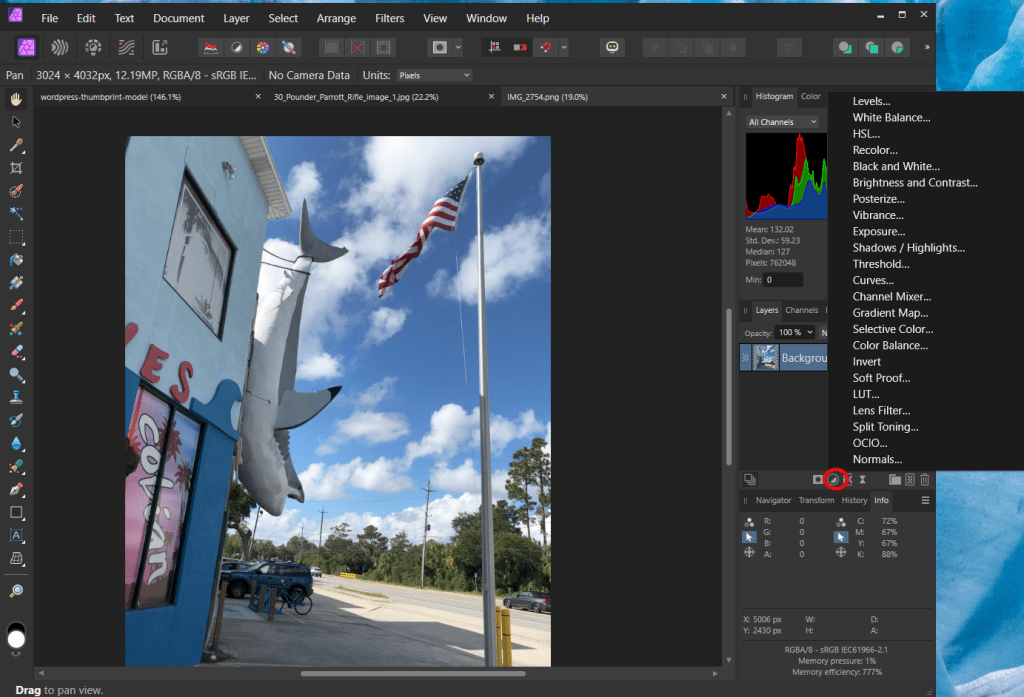
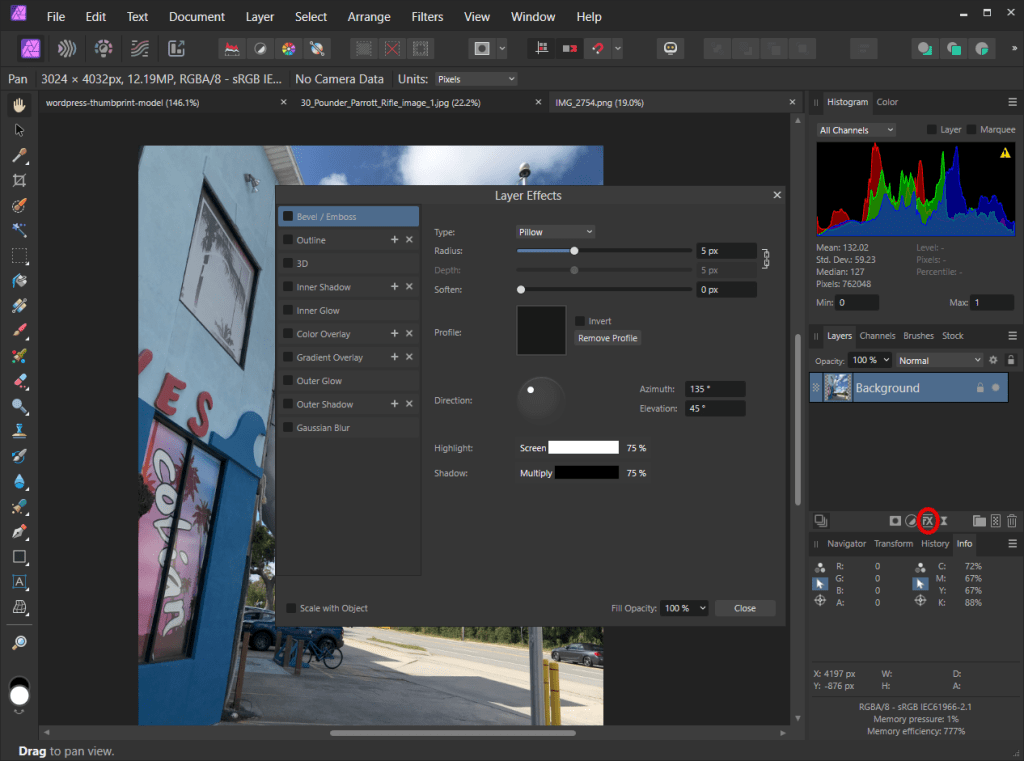
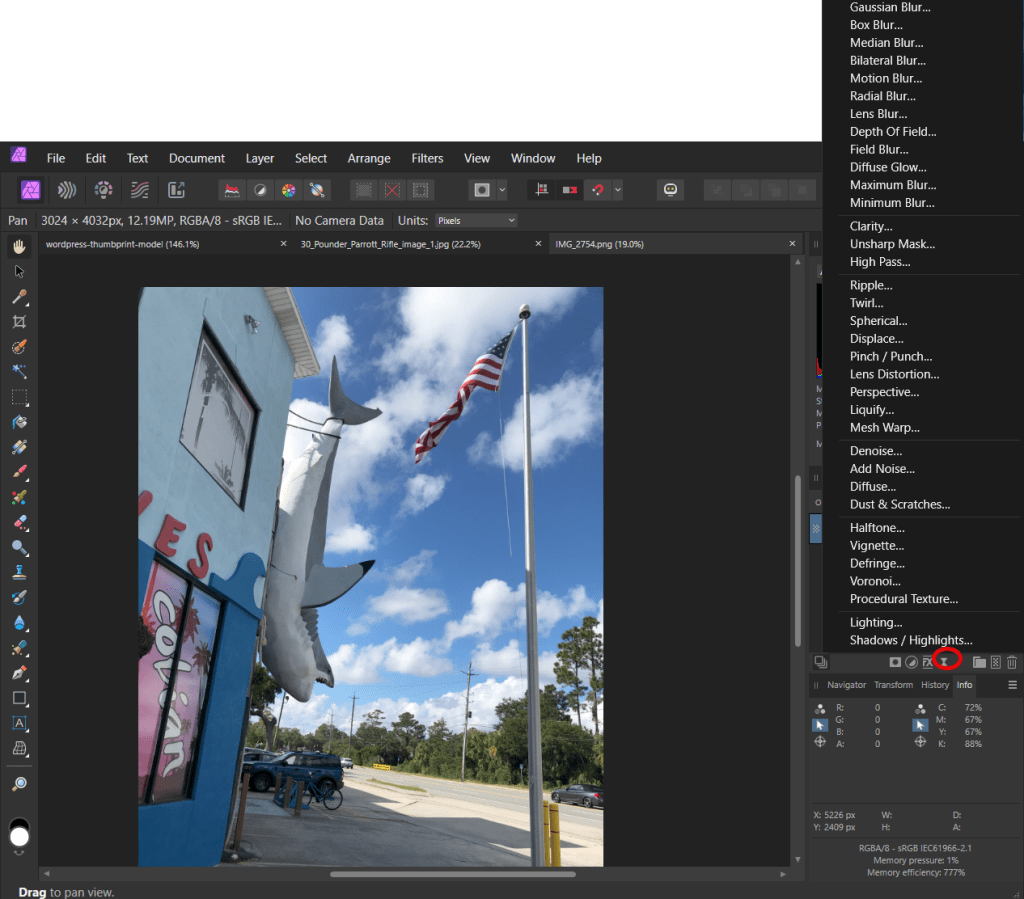
Similar to Photoshop, Affinity has a Filters menu in the top menu bar.
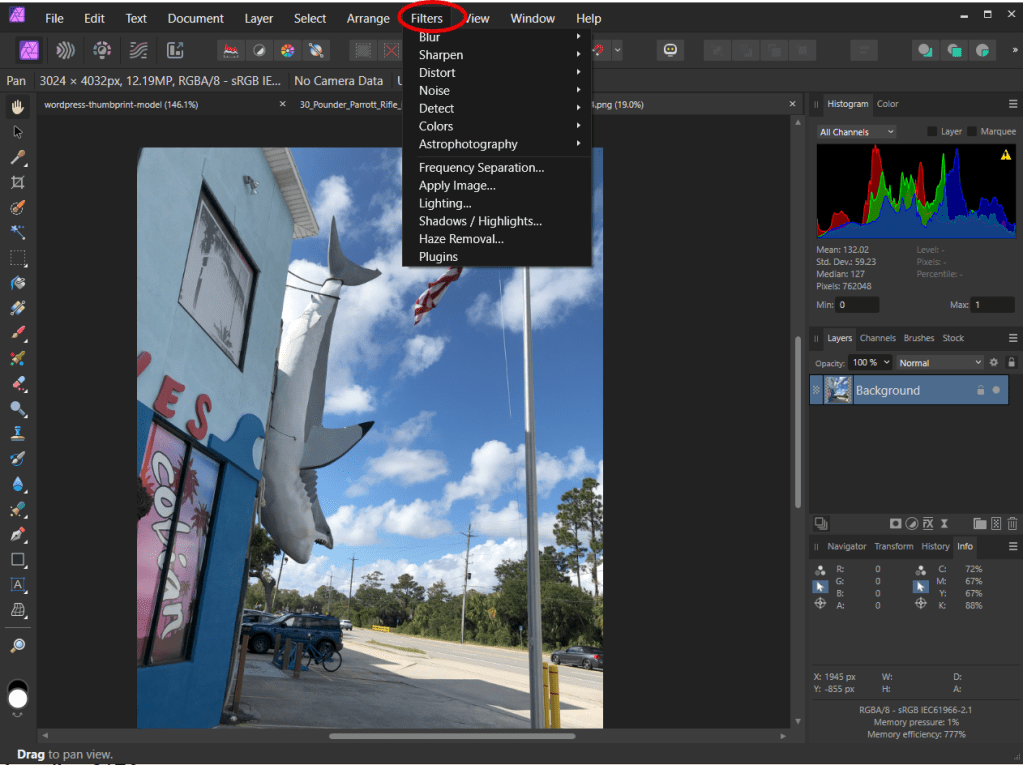
As you can see from Affinity’s filters, there are a few Adobe filters missing here, and if the missing filters are among your favorites, you’ll find this annoying.
The other drawback is that although Affinity does sell plugins on their website, it doesn’t have as many as Adobe–which would be expected given Adobe’s long history.
You cannot animate on a timeline like you can in Photoshop. If you use that a lot in Photoshop, then avoid Affinity.
Affinity makes it easier to build out workflows with images pulled from different locations. The drag-and-drop masking feature in the Layers area is nice too.
Another thing that I like about Affinity is that it saves your work in an Affinity file and preserves the history; the original file that was loaded into Affinity is not altered. When you have your final product, you export to png or whatever. You can always go back into Affinity, open the Affinity file, and return it to early states and revise.
Affinity’s products are available for Windows and Mac desktop and also for the iPad. Currently, a one-time license for Affinity Photo 2 is $70. There’s a bundled version version which also includes Affinity Design and Affinity Publisher for $170.
Wondershare Filmora
Filmora has an intuitive interface and there are plenty of videos on YouTube on how to use it.
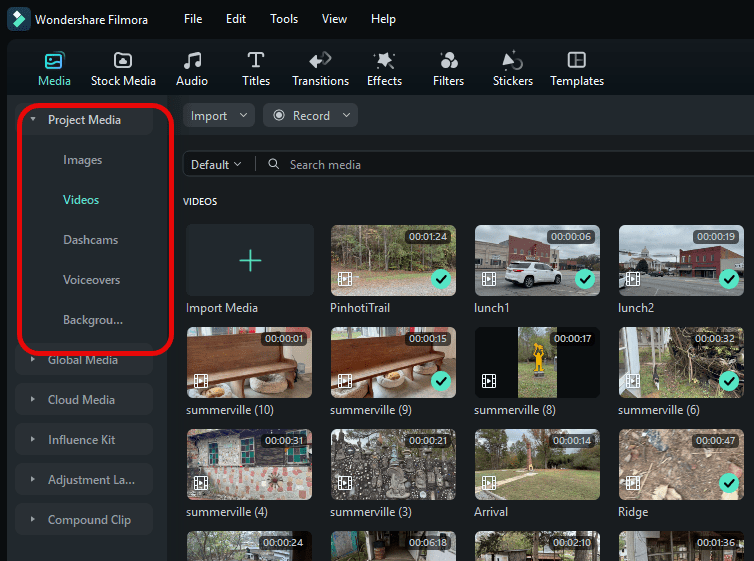
It has convenient workflow. In the upper corner of the screen, you can click on Project Media and create folders and organize them however you want. In the example below, you can see several folders I’ve created folders for still images, videos, dashcam videos, voiceovers, etc. As the files are being dropped into the timeline, they’re given a checkmark to show that the resource has been added. Later you can deleted the unchecked resources that you’re not using.
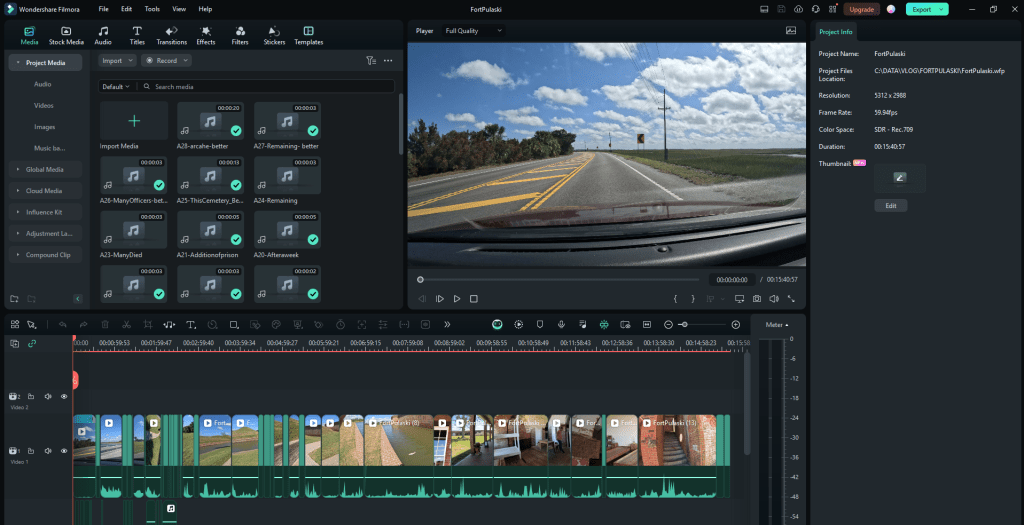
The flow is very straightforward: Dragging the resources and dropping them into the timeline tracks. You can cut and trim similarly to Premiere.
There is a bar above the timeline that provides many of the editing features. If you click the first icon on that line, you’ll see a list of the editing controls you can add to the bar for easy access.
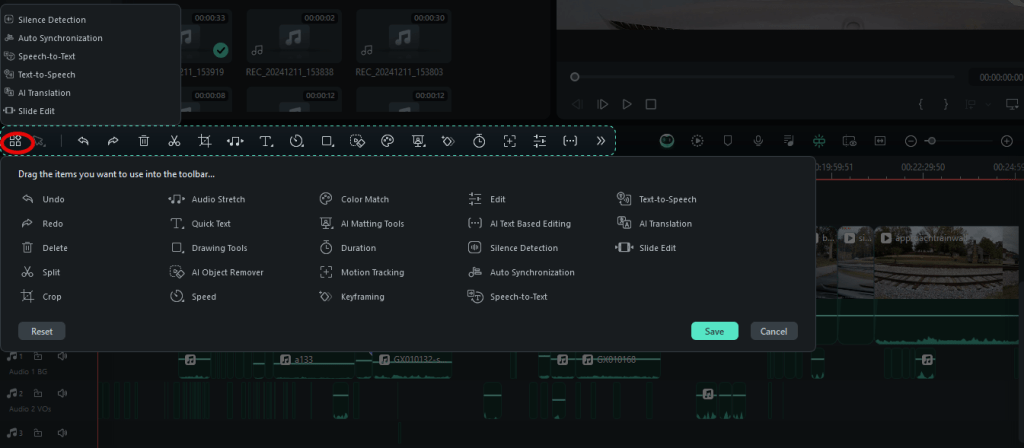
I’ve found that many of the standard features –cropping, adding zooms and pans, setting freeze frames with durations, setting keyframes, reversing frames, etc.–are easier to do.
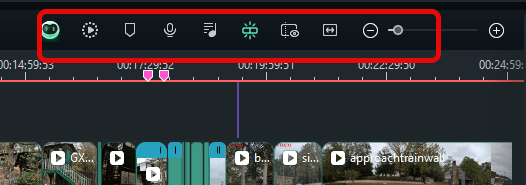
You also have controls here (below) for rendering, adding markers, recording voiceovers, mixing audio, preview mode, setting zoom to fit, and using Filmora copilot.
Some people complain about ‘lagging’ in Filmora. When I first load videos, I run them through render, and they seem to run smoothly. I’ve found that as I had more content, sometimes there is a little more lagging, but it’s not excessive.
Now there is one thing that I hate about Filmora. Filmora is constantly trying to upsell–even though you’ve purchased a one-time license with them–they do this upselling through the interface that you’re working in.
For example, I bought Filmora 12 as a lifetime license. However, whenever I first log in, this comes up (below) and I have to close it.
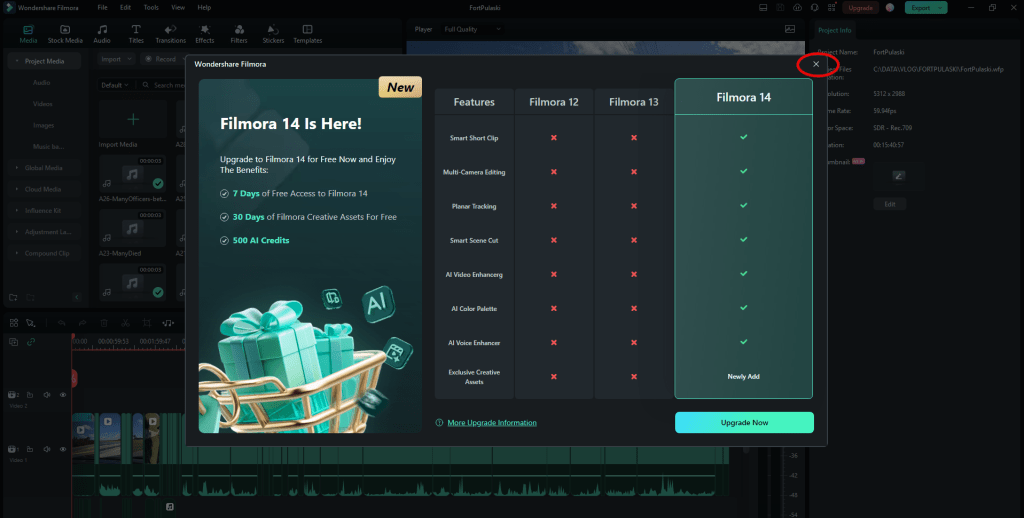
The software comes with some standard backgrounds, audio, transitions, title templates, and effects. However if you go to select for one of these, you have to sort through the ones that are not free. (A ‘not free’ one has a pink diamond on it.) Filmora really wants you to subscribe to their annual $72/yr creative assets plan which offers these additional assets and AI functionality..

Also, sometimes, you’ll be asked if you want to upgrade. You’ll even see this pink Upgrade button displayed the entire time. You might think “They’ve made some updates and I can just click here and update them.”

However, this is a miscommunication. If you click this, it will install the next version of the software and you will need to pay the full cost of the new software. trap. There was quite a bit of controversy with Filmora users over Filmora’s use of the words ‘upgrade’ and ‘update’ –because they were calling it an update for awhile.
Daniel Batal went after Filmora over this and you can see videos about his experiences here.
This upselling through the interface is very annoying. I like to just pay for something and then be left alone to use it. If I want more, I’ll just go to the website and see what’s new.
Wondershare Filmora is $80 for a perpetual license (but is currently on sale for the holidays (Dec 2024) f or $60. The current version (14) offers more AI functionality.
 The Deerberry Files
Leave a comment